
Scroll Views
The ScrollView is a linear layout element. Like a Stack, it arranges elements in a single direction and can add a gap in between them. Unlike a Stack, it only mounts the elements that are visible within the container (plus a buffer).
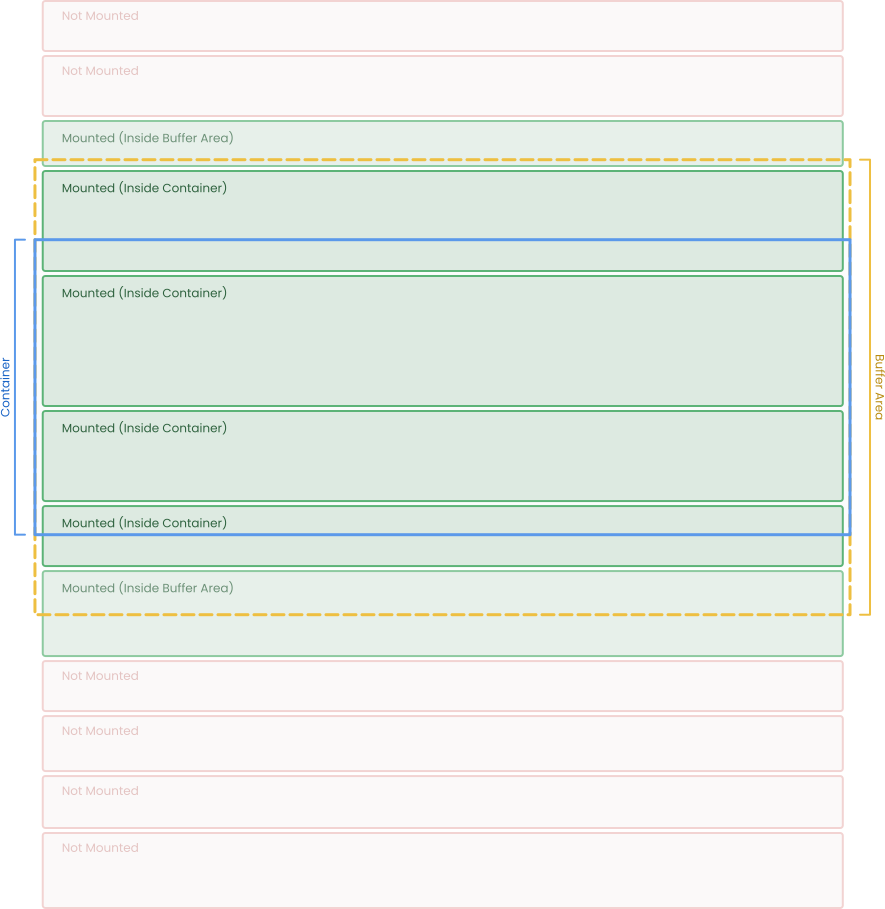
It’s useful to performantly layout a long list of elements that does not fit all at once inside the container.
Because all children are absolutely positioned, this element can’t grow with its content (like Stacks do) and will need layouting data (like width or height).
Rootstrap provides a
SimpleScrollView wrapper.
Props
float position: The scroll position.VisualAttributes visualAttributes: Styling information. Expanded inCreatemethod.ScrollView.Direction direction:Vertical(default) orHorizontal.int gap: Pixel spacing between children.float bufferSize: Extra space at the top and bottom to fit a couple of extra elements.Children children: The elements to be arranged.bool inverted: If true, children are arranged in reverse order.RishList<int> alwaysMountedIndices: Indices of elements that, once mounted, will always stay mounted, even if they go out of the buffer area.float? elementsSize: Use if all elements should have the same size. It performs better and Roots doesn’t need to wait for layout events from the UI Toolkit.Action<float> onElementSize: Callback that reports when the average element size changes.Action<float> onViewportSize: Callback that reports when the viewport size changes.Action<float> onContentSize: Callback that reports when the content size changes.